

Hi there!
I devoted this week to creating a small utility - Kanban board. I will skip steps for creating a local database and will focus on Xamarin controls.
So let's create the app step by step:
Create a blank Xamarin.Forms project
Create models in the shared project
Card.cs
public class Card
{
	public int Id { get; set; }
	public string Name { get; set; }
	public string Description { get; set; }
	public int Order { get; set; }
	public int ColumnId { get; set; }
	public Column Column { get; set; }
}
Column.cs
public class Column
{
	public Column()
	{
		Cards = new ObservableCollection<Card>();
	}

	public int Id { get; set; }
	public string Name { get; set; }
	public int Wip { get; set; } = int.MaxValue;
	public ICollection<Card> Cards { get; set; }
	public int Order { get; set; }
}
ColumnInfo.cs
public class ColumnInfo
{
	public ColumnInfo(int index, Column column)
	{
		Index = index;
		Column = column;
	}

	public Column Column { get; }
	public int Index { get; }
	public bool IsWipReached => Column.Cards.Count >= Column.Wip;
}
It's time to create a ViewModel. Create a new file
MainPageViewModel.cs:
public class MainPageViewModel : ObservableObject
	{
		private ObservableCollection<ColumnInfo> _columns;
		private int _position;
		private Card _dragCard;

		public MainPageViewModel()
		{
			RefreshCommand.Execute(null);
		}

		public ICommand RefreshCommand => new Command(UpdateCollection);

		public ICommand DropCommand => new Command<ColumnInfo>(columnInfo =>
		{
			if (_dragCard is not null && columnInfo.Column.Cards.Count < columnInfo.Column.Wip)
			{
				// Update you card here store info in the database.
				// UPDATE Cards SET ColumnId = _dragCard.ColumnId WHERE Id = _dragCard.Id;

				UpdateCollection();
				Position = columnInfo.Index; // Set CarouselView position
			}
		});

		public ICommand DragStartingCommand => new Command<Card>(card =>
		{
			_dragCard = card; // Store our card
		});

		public ICommand DropCompletedCommand => new Command(() =>
		{
			_dragCard = null; // Reset the card
		});

		public ICommand AddColumn => new Command(() =>
		{
			// Add new column here.
			// INSERT INTO Columns (Name, Wip) VALUES ("Name", 5);
			UpdateCollection();
		});

		public ICommand AddCard => new Command<int>(columnId =>
		{
			// Add new card here. You can also check if WIP is reached.
			// INSERT INTO Cards (Name, ColumnId) VALUES ("Name", columnId);
			UpdateCollection();
		});

		public ICommand DeleteCard => new Command<Card>(async card =>
		{
			var result = await Application.Current.MainPage.DisplayAlert("Delete card", $"Do you want to delete card \"{card.Name}\"?", "Yes", "No");
			if (!result)
			{
				return;
			}

			// Delete card from the database
			// DELETE FROM Cards WHERE Id=card.Id

			UpdateCollection();
		});

		public ICommand DeleteColumn => new Command<ColumnInfo>(async columnInfo =>
		{
			var result = await Application.Current.MainPage.DisplayAlert("Delete column", $"Do you want to delete column \"{columnInfo.Column.Name}\" and all its cards?", "Yes", "No");
			if (!result)
			{
				return;
			}

			// Delete column from the database
			// DELETE FROM Columns WHERE Id=columnInfo.Column.Id

			UpdateCollection();
		});

		public ObservableCollection<ColumnInfo> Columns
		{
			get => _columns;
			set => SetProperty(ref _columns, value);
		}

		public int Position
		{
			get => _position;
			set => SetProperty(ref _position, value);
		}

		private void UpdateCollection()
		{
			IsBusy = true;
			using (var db = new ApplicationContext(App.DbPath))
			{
				Columns = db.Columns.Include(c => c.Cards)
				                                        .OrderBy(c => c.Order)
				                                        .ToList()
				                                        .Select(OrderCards)
				                                        .ToObservableCollection();
				Position = 0;
			}

			IsBusy = false;
		}

		private static ColumnInfo OrderCards(Column c, int columnNumber)
		{
			c.Cards = c.Cards.OrderBy(card => card.Order).ToList();
			return new ColumnInfo(columnNumber, c);
		}
	}
Finally the UI part.
Add base style and set the view model for the MainPage.
<ContentPage.Resources>
	<Color x:Key="CardBackgroundColor">White</Color>
	<Color x:Key="BoardBackgroundColor">DimGray</Color>
	<Color x:Key="BoardTitleFontColor">White</Color>
	<Color x:Key="FontColor">Black</Color>
	<Color x:Key="ColumnBackgroundColor">DarkGray</Color>
	<Color x:Key="ColumnWipReachedBackgroundColor">IndianRed</Color>
	<x:Double x:Key="BoardTitleSize">20</x:Double>
	<x:Double x:Key="CardTitleSize">14</x:Double>
	<x:Double x:Key="CardDescriptionSize">12</x:Double>
	<x:Double x:Key="ColumnTitleSize">18</x:Double>
	<OnPlatform x:Key="FontAwesomeSolid" x:TypeArguments="x:String">
		<On Platform="Android" Value="FontAwesome5Solid.otf#Regular" />
		<On Platform="iOS" Value="FontAwesome5Free-Solid" />
	</OnPlatform>
</ContentPage.Resources>
<ContentPage.BindingContext>
	<kanbanboard:MainPageViewModel />
</ContentPage.BindingContext>
2. Add the `RefreshView` so we can swipe to update the content:<RefreshView Command="{Binding RefreshCommand}"
IsRefreshing="{Binding IsBusy}">
...
<RefreshView>3. Now let's add the main page container with the name of the project in the header and button for adding columns in the footer:<VerticalStackLayout BackgroundColor="{DynamicResource BoardBackgroundColor}">
<Label
FontSize="{StaticResource BoardTitleSize}"
HorizontalOptions="Center"
Text="Test project name"
TextColor="{DynamicResource BoardTitleFontColor}" />
<!-- The Kanban board will be here -->
<Button
BackgroundColor="Transparent"
Command="{Binding AddColumn}"
Text="Add new column" />
</VerticalStackLayout>4. We will use `CarouselView` for Columns:<CarouselView
x:Name="Board"
IndicatorView="Indicator"
EmptyView="No columns to display"
ItemsSource="{Binding Columns}"
Position="{Binding Position}"
Loop="False"
PeekAreaInsets="10">
<CarouselView.ItemsLayout>
<LinearItemsLayout ItemSpacing="10" Orientation="Horizontal" />
</CarouselView.ItemsLayout>
<CarouselView.ItemTemplate>
<DataTemplate>
<!-- We will add a template with the next step -->
</DataTemplate>
</CarouselView.ItemTemplate>
</CarouselView>
<IndicatorView
x:Name="Indicator"
HorizontalOptions="Center"
IndicatorColor="White"
SelectedIndicatorColor="Black" />5. Let's create a Column template:<Frame Padding="0" CornerRadius="10">
<Frame.GestureRecognizers>
<DropGestureRecognizer AllowDrop="True"
DropCommand="{Binding BindingContext.DropCommand, Source={x:Reference Board}}"
DropCommandParameter="{Binding .}"/>
</Frame.GestureRecognizers>
<Frame.Triggers>
<DataTrigger
Binding="{Binding IsWipReached}"
TargetType="Frame"
Value="True">
<Setter Property="BackgroundColor" Value="{DynamicResource ColumnWipReachedBackgroundColor}" />
</DataTrigger>
<DataTrigger
Binding="{Binding IsWipReached}"
TargetType="Frame"
Value="False">
<Setter Property="BackgroundColor" Value="{DynamicResource ColumnBackgroundColor}" />
</DataTrigger>
</Frame.Triggers>
<VerticalStackLayout Margin="10">
<HorizontalStackLayout Margin="10">
<Label
FontAttributes="Bold"
FontSize="{StaticResource ColumnTitleSize}"
HorizontalOptions="Start"
Text="{Binding Column.Name}"
VerticalOptions="Center" />
<Label
FontSize="{StaticResource ColumnTitleSize}"
HorizontalOptions="CenterAndExpand"
VerticalOptions="Center">
<Label.FormattedText>
<FormattedString>
<Span Text="{Binding Column.Cards.Count}" />
<Span>/</Span>
<Span Text="{Binding Column.Wip}" />
</FormattedString>
</Label.FormattedText>
</Label>
<ImageButton
Command="{Binding BindingContext.DeleteColumn, Source={x:Reference Board}}"
CommandParameter="{Binding .}"
HorizontalOptions="EndAndExpand"
VerticalOptions="Center">
<ImageButton.Source>
<FontImageSource
FontFamily="{StaticResource FontAwesomeSolid}"
Glyph=""
Size="{StaticResource ColumnTitleSize}"
Color="{DynamicResource FontColor}" />
</ImageButton.Source>
</ImageButton>
</HorizontalStackLayout>
<CollectionView EmptyView="No cards to display" ItemsSource="{Binding Column.Cards}">
<CollectionView.ItemsLayout>
<LinearItemsLayout ItemSpacing="5" Orientation="Vertical" />
</CollectionView.ItemsLayout>
<CollectionView.ItemTemplate>
<DataTemplate>
<!-- Card template will be here -->
</DataTemplate>
</CollectionView.ItemTemplate>
</CollectionView>
<Button
BackgroundColor="Transparent"
Command="{Binding BindingContext.AddCard, Source={x:Reference Board}}"
CommandParameter="{Binding Column.Id}"
Text="Add new card" />
</VerticalStackLayout>
</Frame>6. The Final part - Card Template:<Frame
Margin="5,0"
Padding="0"
BackgroundColor="{DynamicResource CardBackgroundColor}"
CornerRadius="10">
<Frame.GestureRecognizers>
<DragGestureRecognizer CanDrag="True"
DragStartingCommand="{Binding BindingContext.DragStartingCommand, Source={x:Reference Board}}"
DragStartingCommandParameter="{Binding .}"
DropCompletedCommand="{Binding BindingContext.DropCompletedCommand, Source={x:Reference Board}}"/>
</Frame.GestureRecognizers>
<Grid Margin="10">
<Grid.RowDefinitions>
<RowDefinition Height="Auto" />
<RowDefinition Height="Auto" />
</Grid.RowDefinitions>
<Grid.ColumnDefinitions>
<ColumnDefinition Width="*" />
<ColumnDefinition Width="Auto" />
</Grid.ColumnDefinitions>
<Label
Grid.Column="0"
FontAttributes="Bold"
FontSize="{StaticResource CardTitleSize}"
Text="{Binding Name}" />
<Label
Grid.Row="1"
Grid.Column="0"
FontSize="{StaticResource CardDescriptionSize}"
Text="{Binding Description}"
VerticalOptions="End" />
<ImageButton
Grid.Row="0"
Grid.RowSpan="2"
Grid.Column="1"
Command="{Binding BindingContext.DeleteCard, Source={x:Reference Board}}"
CommandParameter="{Binding .}"
WidthRequest="{StaticResource CardTitleSize}"
HeightRequest="{StaticResource CardTitleSize}"
HorizontalOptions="EndAndExpand">
<ImageButton.Source>
<FontImageSource
FontFamily="{StaticResource FontAwesomeSolid}"
Glyph=""
Size="{StaticResource CardTitleSize}"
Color="{DynamicResource FontColor}" />
</ImageButton.Source>
</ImageButton>
</Grid>
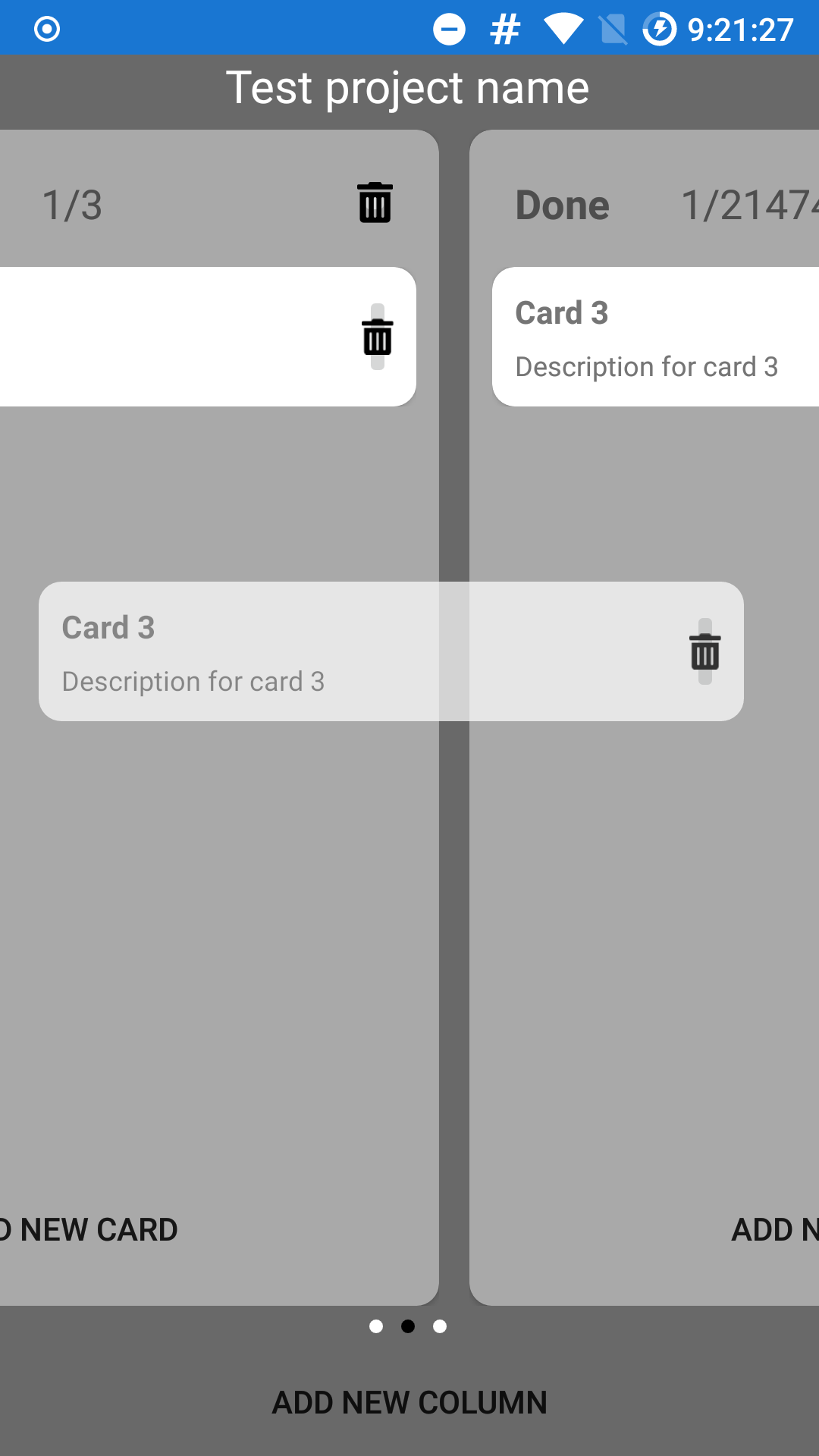
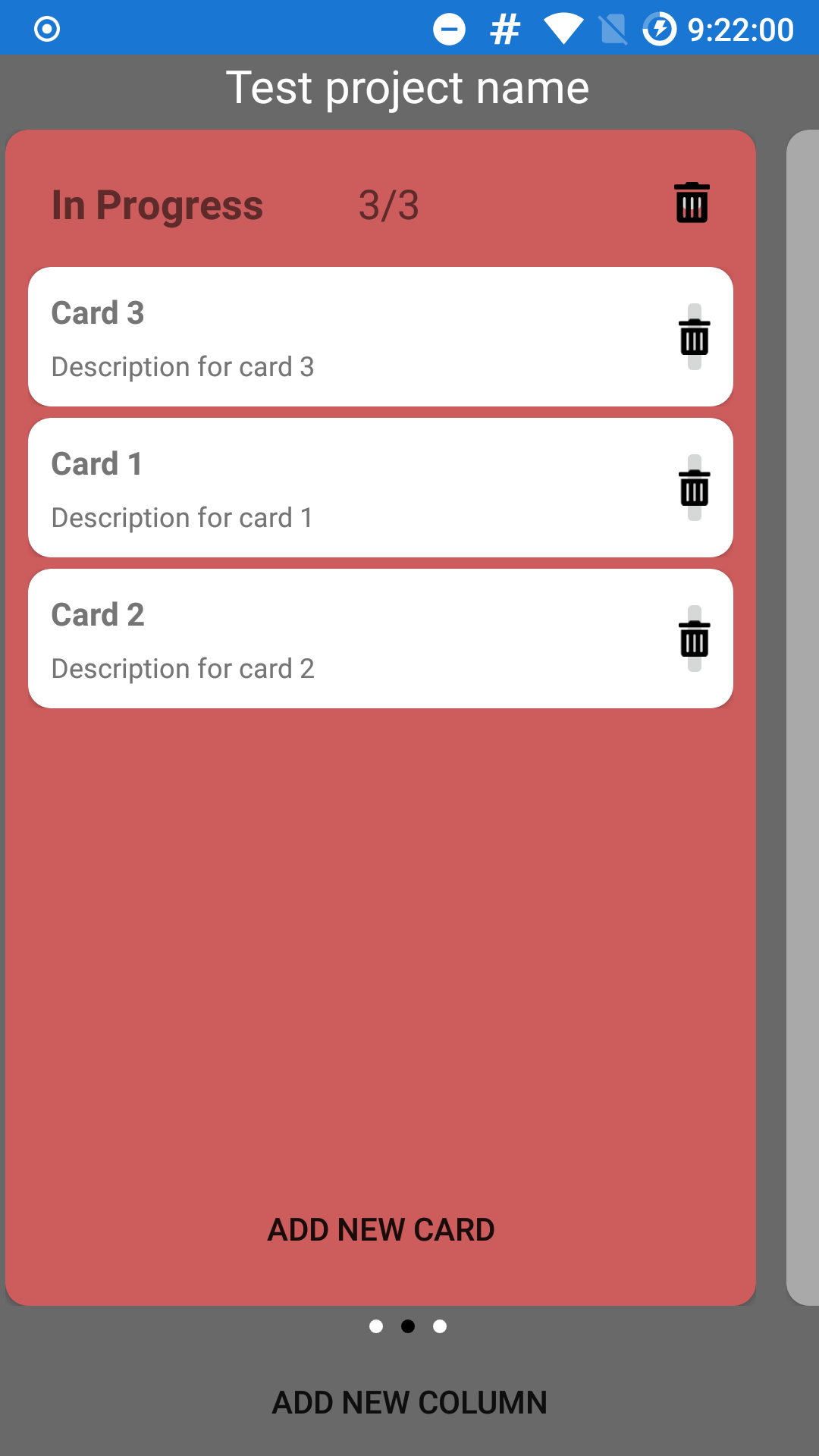
</Frame>The result looks like this:
The full source code is available on GitHub.